


Copyright © moonhuilee 2026
EPOS 360: All-in-one POS for your business
Introduction
Today, micro, small and medium sized enterprises (MSMEs) play an important role in economies worldwide. They account for roughly 90% of businesses and provide more than 70% of global employment.
Despite their importance, many micro and small enterprises are still underserved and often overlooked. Many operate informally and struggle to access support such as government programs, financial services, professional training and digital tools. Inefficient workflows and disconnected tools also make it harder for them to grow sustainably.
To address these gaps, Ant International built EPOS 360, an all-in-one mobile POS platform that helps merchants get started quickly, run daily operations efficiently and grow their business with confidence.
Product Overview
EPOS 360 is an all-in-one mobile POS platform designed for food and beverage merchants. It unifies ordering, payments and business insights into a single mobile experience, helping small merchants run daily operations efficiently and grow their business.
Problem
While mobile POS solutions have reached industry maturity, many food and beverage merchants still struggle with day to day operational friction, especially during peak service hours.
Insight 1
Cashiers operate in high pressure, time sensitive environments where every additional tap increases queue time and cognitive load.
Design implication:
The core ordering and checkout flow must prioritize speed, large touch targets and minimal decision friction.
Insight 2
Cashiers operate in high pressure, time sensitive environments where every additional tap increases queue time and cognitive load.
Design implication:
The core ordering and checkout flow must prioritize speed, large touch targets and minimal decision friction.
Insight 3
Cashiers operate in high pressure, time sensitive environments where every additional tap increases queue time and cognitive load.
Design implication:
The core ordering and checkout flow must prioritize speed, large touch targets and minimal decision friction.
Insight 4
Cashiers operate in high pressure, time sensitive environments where every additional tap increases queue time and cognitive load.
Design implication:
The core ordering and checkout flow must prioritize speed, large touch targets and minimal decision friction.
My Role
I led the end to end operations experience, one of the most critical surfaces of EPOS 360. My ownership covered the full transaction lifecycle, including menu creation and management, order creation and checkout through payment completion. This work focused on reducing cashier friction, improving transaction speed and ensuring reliability in high volume food and beverage environments.
I also owned the online ordering experience, including online store setup, store management and multi channel publishing and launch. This capability enables merchants to extend beyond in store transactions and establish a scalable digital sales presence.
In parallel, I contributed during the early stage of the mobile design system. My focus was to ensure consistency across POS surfaces and to support scalable component patterns for operations heavy use cases.
Design Principles
Efficiency
Cashiers operate in high pressure environments where speed and accuracy directly impact revenue and customer satisfaction. The app must enable fast task completion with minimal cognitive load.
To support this, the experience reduces taps across ordering and checkout, prioritizes larger touch targets for fast input, enables quick error recovery and is optimized for one handed and hands busy scenarios.
Insightful
Store owners need more than raw data. They need clear, actionable insights that guide business decisions.
To support this, the product surfaces key sales metrics at a glance, highlights anomalies and growth opportunities and translates data into plain language recommendations through AI driven next best actions.
Core Operations Flow
Case Study 1
Streamlining the sell experience from menu creation
to payment
The sell flow from menu setup to payment completion is the most business critical path in EPOS 360. For MSME food and beverage merchants, speed, simplicity and reliability directly affect daily revenue and staff efficiency.
Given the mobile first positioning of EPOS 360, the challenge was to deliver a fast and easy to learn experience on a smaller device footprint while supporting diverse merchant needs, from quick service stalls and hawkers to full service restaurants.
Problem
While mobile POS solutions have reached feature parity across the market, many MSME merchants still face practical barriers when adopting digital tools. Based on research synthesis, we identified several recurring challenges:
- High equipment costs that limit adoption
- Complex and difficult to learn POS software
- Limited store space that makes bulky setups impractical
- Traditional cash registers with insufficient functionality
- Free POS tools that lack reliability and scalability
- Mobile POS solutions that are still too complex for small merchants
The opportunity was not to add more features but to reduce setup friction and simplify the daily sell workflow for MSME merchants.
Design Goals
To guide the redesign of the core operations flow, we focused on 3 priorities:
- Enable merchants to start selling with minimal setup time
- Reduce friction during order creation and checkout
- Support diverse selling behaviors across MSME F&B scenarios
Solution
We redesigned the end to end operations experience to support fast onboarding, flexible selling modes and streamlined payment. The new flow emphasizes quick menu setup, simplified order entry and high confidence checkout on mobile devices.
Key improvements focused on 3 areas:
- Faster menu creation through OCR assisted setup
- Flexible selling modes tailored to regional merchant behaviors
- Faster payment with large, easy to tap buttons
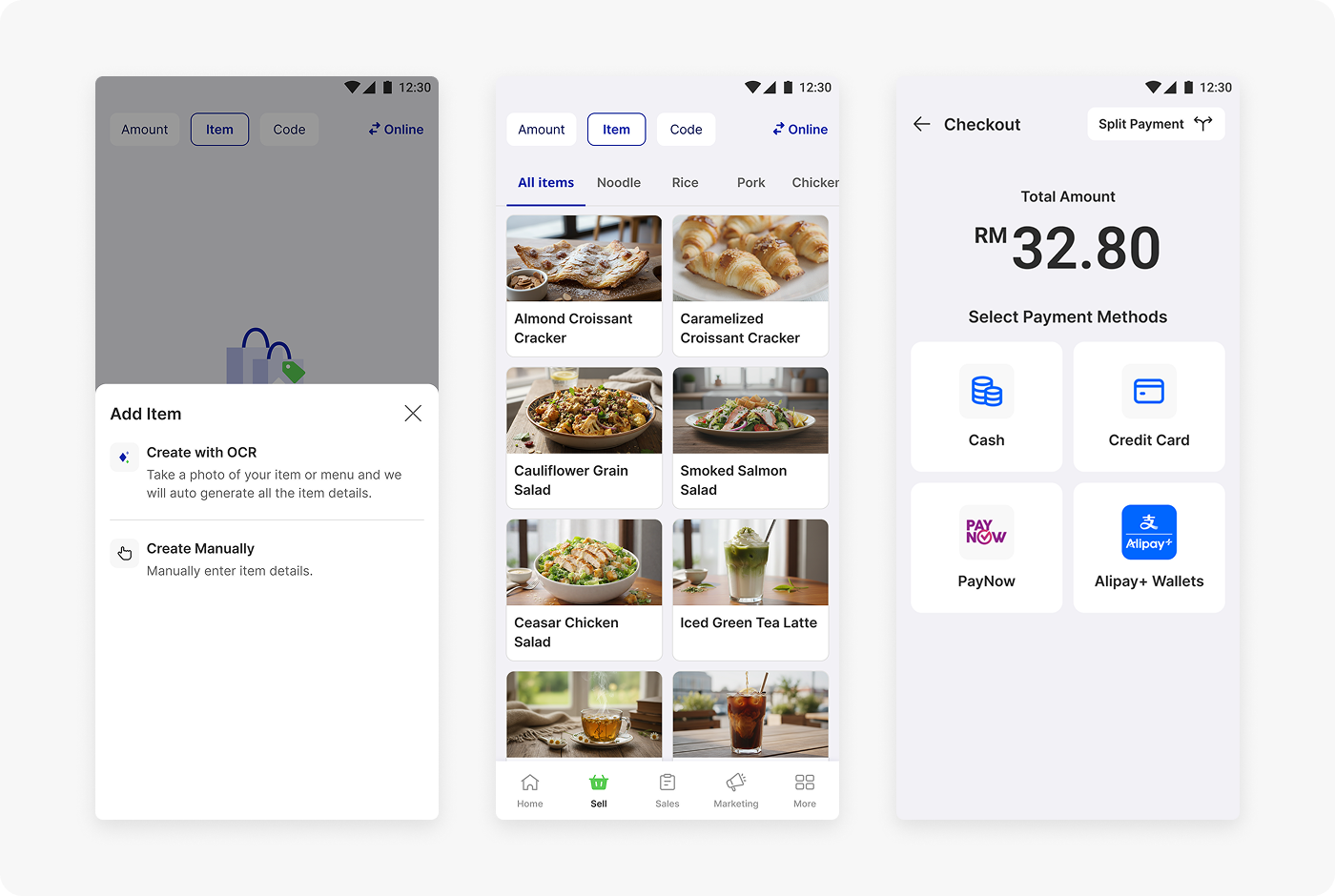
- Faster Menu Creation with OCR
Problem
Menu setup is often the biggest barrier for small merchants adopting POS systems. Manually keying complex F&B menus is time consuming and discourages onboarding.
What we changed
We introduced OCR powered menu creation that allows merchants to capture their physical menu using the camera. The system automatically extracts item names and pricing, significantly reducing manual input.
To further support merchants without product photography, we also provided optional AI generated food imagery.
Why it works
This approach shortens time to first sale and lowers the technical barrier for MSME merchants, especially hawkers and small operators who need a fast and low effort setup experience.
Menu creation with OCR · Prototype
- Flexible Selling Modes for Diverse Merchant Needs
Problem
MSME F&B merchants across Southeast Asia use different selling behaviors. A single rigid ordering model does not fit hawker stalls, cafes and quick service environments.
What we changed
We introduced 3 selling modes:
- Amount mode for quick ad hoc charging
- Item mode for structured menu ordering with modifiers
- Code mode for fast numeric entry commonly used in food courts and dim sum style operations
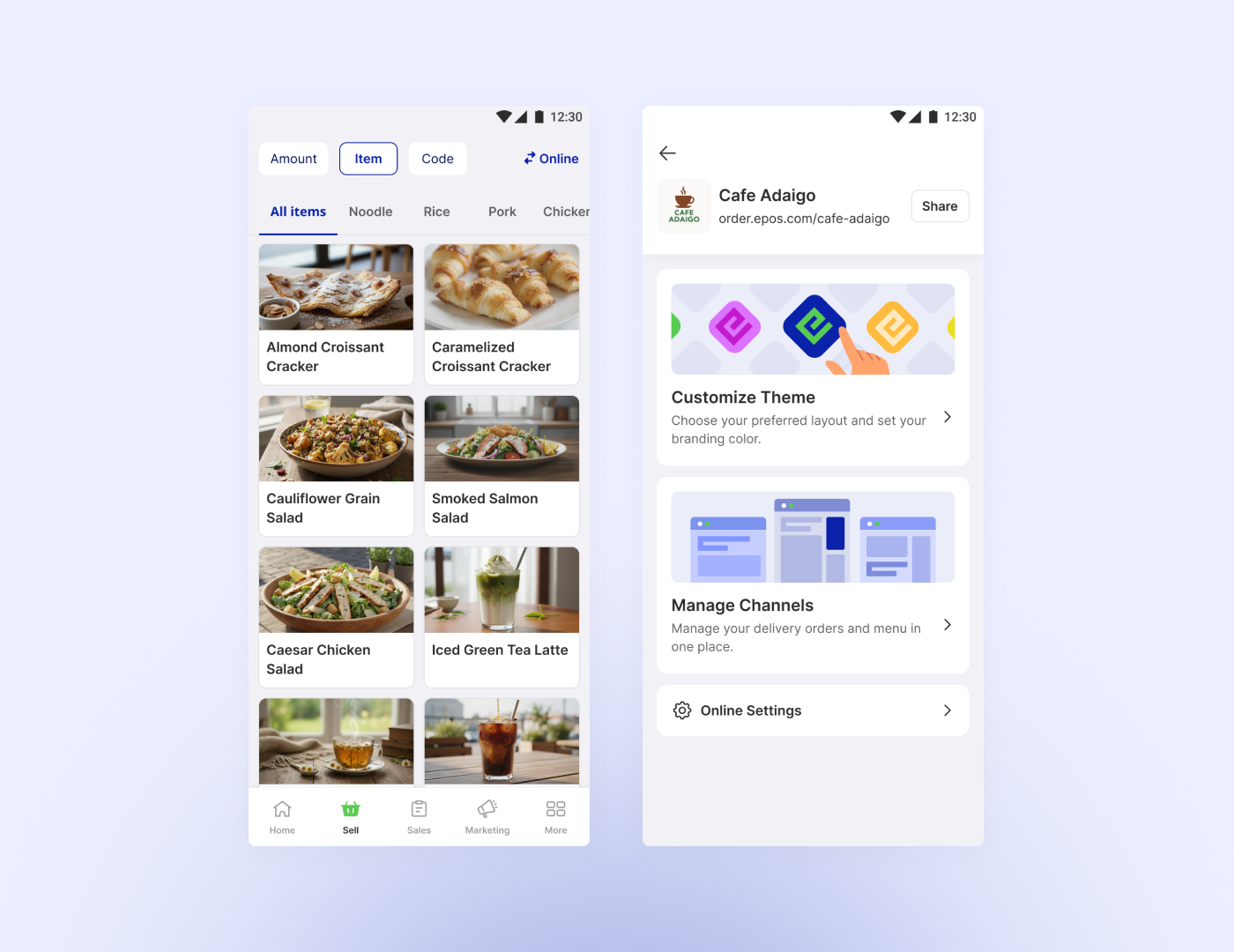
In Amount mode, we redesigned the single amount flow so merchants can directly enter and charge without tapping the plus icon, reducing unnecessary interaction steps.
Why it works
This flexibility allows EPOS 360 to adapt to real regional workflows while keeping each mode fast and focused for its primary use case.
3 selling modes: Amount, Item, Code · Prototype
- Faster and More Error Resistant Checkout
Problem
Checkout speed and accuracy directly impact queue time and merchant confidence, especially on small mobile screens.
What we changed
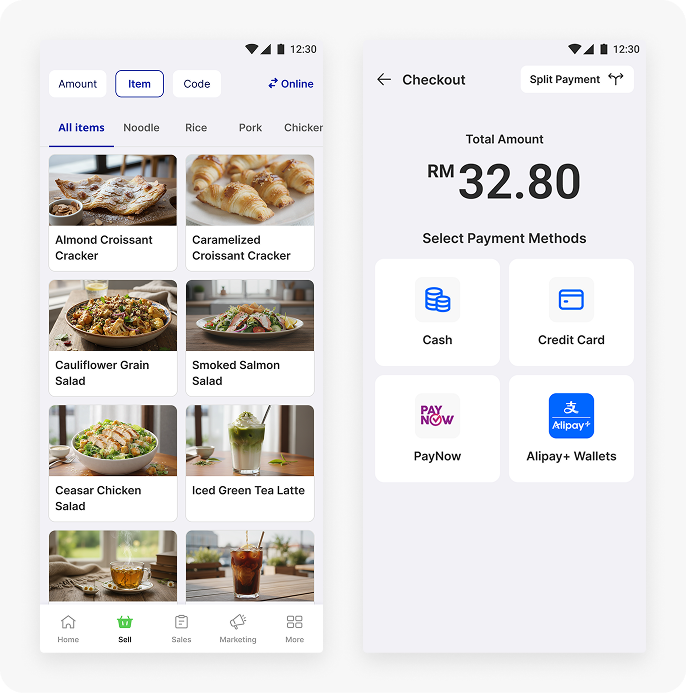
We optimized the payment selection experience by emphasizing the total amount and introducing large tap areas for each payment method to reduce mis taps. For card and QR payments, merchants no longer need to manually re enter the amount, enabling a faster and more streamlined checkout.
The cart was kept lightweight, serving primarily as a quick review surface for actions such as void, comp, edit and remove before payment.
Why it works
The redesigned checkout reduces cognitive load, minimizes input errors and supports faster transaction completion in high volume environments.
Checkout flow · Prototype
Validation and Impact
We conducted usability validation through Maze to evaluate the redesigned sell flow. A total of 40 participants from Southeast Asia took part in the study, reflecting the primary target market of EPOS 360.
The testing focused on 3 key flows:
Single Amount mode charge, split payment and Item mode ordering. Results showed an overall reduction in time to complete checkout, indicating improved transaction efficiency and learnability across the core scenarios.
These findings validated our direction of simplifying setup and minimizing interaction friction throughout the sell journey.
Beyond optimizing the in store sell flow, EPOS 360 also helps merchants expand their business through integrated online store capabilities.
Case Study 2
Online Store Management
While the core operations flow supports daily in-store operations, many MSME food and beverage merchants are increasingly looking to expand into online channels. However, setting up and managing an online store is often fragmented and technically challenging for small operators.
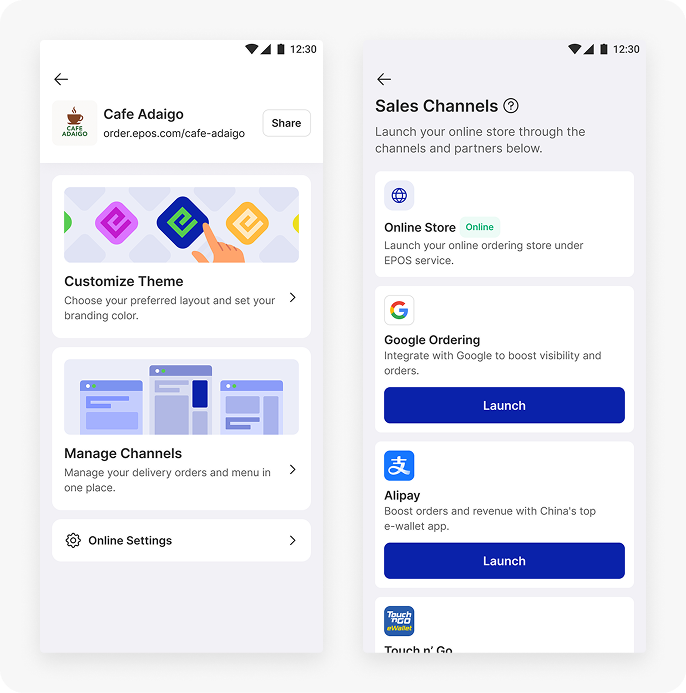
EPOS 360 simplifies this by enabling merchants to launch and run their online store directly on Alipay, Touch n Go and Google Ordering. Each onboarded merchant is hosted on the EPOS infrastructure and automatically receives a unique store URL, allowing them to go online quickly without additional technical setup.
This helps merchants reach more customers and drive additional sales without managing multiple disconnected platforms.
Design Goals
My goal was to reduce the complexity of going online while keeping the experience consistent with the in-store workflow. The design focused on 3 key areas:
- Customize online store for first time merchants
- Online order management
- Multi channel publishing to extend reach
- Customize online store for first time merchants
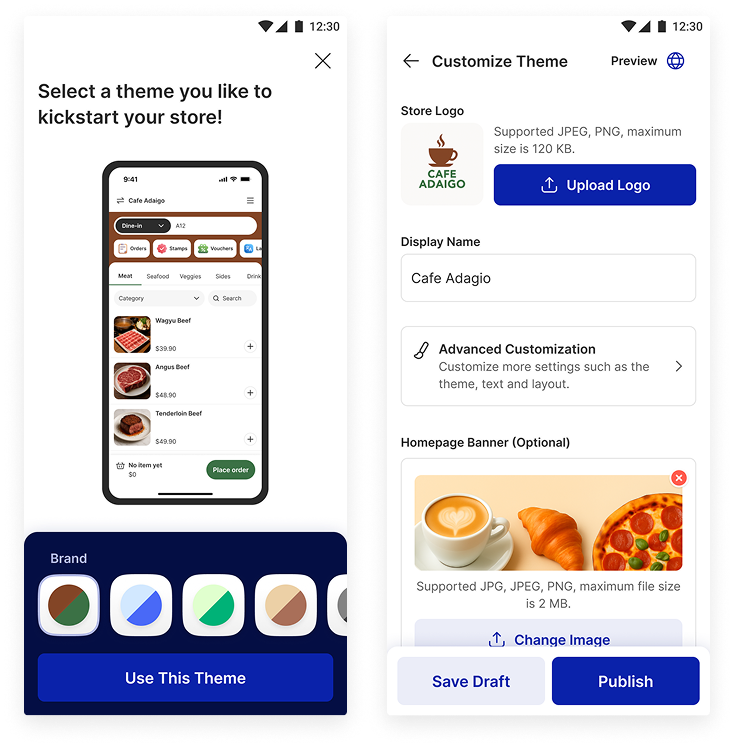
Guided store customization
First time merchants can quickly set up and customize their online store through a structured flow that lowers the barrier to entry and builds onboarding confidence.
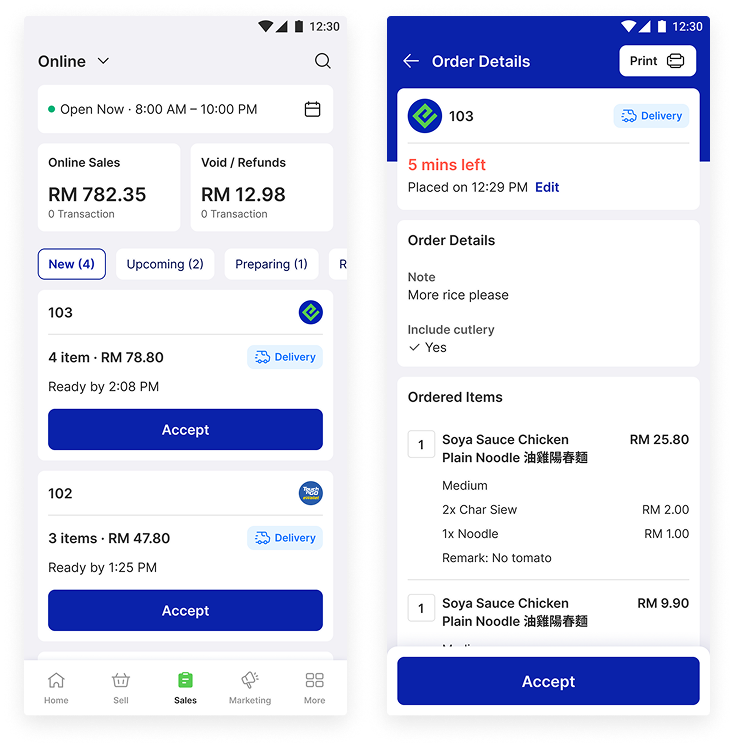
- Online order management
Unified online order handling
Incoming online orders appear within the same operational environment, allowing merchants to monitor and fulfill orders without switching between systems.
- Multi channel publishing to extend reach
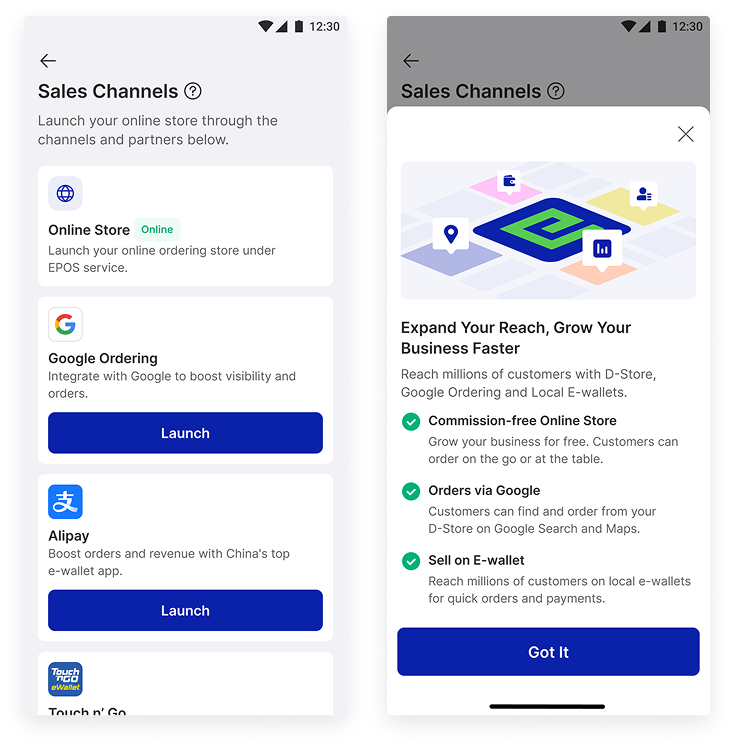
Multi channel launch
Merchants can publish their store to platforms such as Alipay, Touch n Go and Google Ordering from a single workflow, making expansion beyond in store sales more accessible.
Outcome
The online store capability complements the core operations flow by enabling MSME merchants to evolve from offline only selling toward a unified online and offline business model, without adding significant operational complexity.
Next Steps
Impact and Outcomes
The redesigned operations experience improved the overall efficiency and learnability of the EPOS 360 sell flow. Through Maze usability validation with 40 Southeast Asia participants, the updated design demonstrated a measurable reduction in time to complete checkout across key scenarios, including Single Amount mode, split payment and Item mode ordering.
The OCR assisted menu setup also shortened the time required for merchants to digitize their menus, lowering the barrier for first time POS adoption among MSME food and beverage operators.
Together, these improvements support EPOS 360’s goal of helping small merchants start faster, operate more efficiently and scale their business with greater confidence.
Key Learnings
Design for real merchant diversity
MSME food and beverage merchants do not operate in a single standardized workflow. Supporting multiple selling modes such as Amount, Item and Code was critical to accommodate regional behaviors, especially in Southeast Asia hawker and food court environments.
Reducing setup friction drives adoption
For small merchants, the biggest barrier is often getting started. Features like OCR menu creation significantly reduce onboarding effort and help merchants reach their first transaction faster.
Mobile POS demands interaction discipline
Designing for smaller mobile devices reinforced the importance of large touch targets, minimized taps and clear hierarchy. Small inefficiencies become amplified in high frequency cashier workflows.
Simplicity requires deliberate tradeoffs
Creating a fast sell flow was not about adding features but about removing unnecessary steps while preserving flexibility for complex F&B scenarios.


Copyright © moonhuilee 2026
EPOS 360:
All-in-one POS for your business
Introduction
Today, micro, small and medium sized enterprises (MSMEs) play an important role in economies worldwide. They account for roughly 90% of businesses and provide more than 70% of global employment.
Despite their importance, many micro and small enterprises are still underserved and often overlooked. Many operate informally and struggle to access support such as government programs, financial services, professional training and digital tools. Inefficient workflows and disconnected tools also make it harder for them to grow sustainably.
To address these gaps, Ant International built EPOS 360, an all-in-one mobile POS platform that helps merchants get started quickly, run daily operations efficiently and grow their business with confidence.
Product Overview
EPOS 360 is an all-in-one mobile POS platform designed for food and beverage merchants. It unifies ordering, payments and business insights into a single mobile experience, helping small merchants run daily operations efficiently and grow their business.
Problem
While mobile POS solutions have reached industry maturity, many food and beverage merchants still struggle with day to day operational friction, especially during peak service hours.
Insight 1
Cashiers operate in high pressure, time sensitive environments where every additional tap increases queue time and cognitive load. Even small interaction delays can compound quickly during peak service periods and directly impact throughput.
To address this, the core ordering and checkout experience prioritizes speed, larger touch targets and minimal decision friction, enabling cashiers to complete transactions quickly and confidently.
Insight 2
Many food and beverage merchants manage complex menus with modifiers, variants and frequent updates, which makes menu setup and ongoing maintenance prone to errors. This complexity often slows down operations and increases the risk of incorrect orders.
To support this reality, the menu management experience is designed to be flexible yet simple, with a clear structure and fast editing capabilities that reduce setup effort and minimize mistakes.
Insight 3
Merchants often lack clear and actionable visibility into their sales performance and next steps for growth. Raw data alone makes it difficult for owners to quickly understand what is working and where to improve.
To support better decision making, the product surfaces key metrics at a glance and translates data into simple, plain language recommendations that guide merchants toward meaningful actions.
Insight 4
As merchants expand to online channels, they often struggle to keep in store and online operations synchronized. Managing multiple systems increases operational overhead and creates inconsistencies across channels.
To reduce this friction, the experience provides a unified workflow that allows merchants to manage both in store and online operations from a single platform.
My Role
I led the end to end operations experience, one of the most critical surfaces of EPOS 360. My ownership covered the full transaction lifecycle, including menu creation and management, order creation and checkout through payment completion. This work focused on reducing cashier friction, improving transaction speed and ensuring reliability in high volume food and beverage environments.
I also owned the online ordering experience, including online store setup, store management and multi channel publishing and launch. This capability enables merchants to extend beyond in store transactions and establish a scalable digital sales presence.
In parallel, I contributed during the early stage of the mobile design system. My focus was to ensure consistency across POS surfaces and to support scalable component patterns for operations heavy use cases.
Design Principles
Efficiency
Cashiers operate in high pressure environments where speed and accuracy directly impact revenue and customer satisfaction. The app must enable fast task completion with minimal cognitive load.
To support this, the experience reduces taps across ordering and checkout, prioritizes larger touch targets for fast input, enables quick error recovery and is optimized for one handed and hands busy scenarios.
Insightful
Store owners need more than raw data. They need clear, actionable insights that guide business decisions.
To support this, the product surfaces key sales metrics at a glance, highlights anomalies and growth opportunities and translates data into plain language recommendations through AI driven next best actions.
Core Operations Flow
Case Study 1
Streamlining the sell experience from menu creation
to payment
The sell flow from menu setup to payment completion is the most business critical path in EPOS 360. For MSME food and beverage merchants, speed, simplicity and reliability directly affect daily revenue and staff efficiency.
Given the mobile first positioning of EPOS 360, the challenge was to deliver a fast and easy to learn experience on a smaller device footprint while supporting diverse merchant needs, from quick service stalls and hawkers to full service restaurants.
Problem
While mobile POS solutions have reached feature parity across the market, many MSME merchants still face practical barriers when adopting digital tools. Based on research synthesis, we identified several recurring challenges:
- High equipment costs that limit adoption
- Complex and difficult to learn POS software
- Limited store space that makes bulky setups impractical
- Traditional cash registers with insufficient functionality
- Free POS tools that lack reliability and scalability
- Mobile POS solutions that are still too complex for small merchants
The opportunity was not to add more features but to reduce setup friction and simplify the daily sell workflow for MSME merchants.
Design Goals
To guide the redesign of the core operations flow, we focused on 3 priorities:
- Enable merchants to start selling with minimal setup time
- Reduce friction during order creation and checkout
- Support diverse selling behaviors across MSME F&B scenarios
Solution
We redesigned the end to end operations experience to support fast onboarding, flexible selling modes and streamlined payment. The new flow emphasizes quick menu setup, simplified order entry and high confidence checkout on mobile devices.
Key improvements focused on 3 areas:
- Faster menu creation through OCR assisted setup
- Flexible selling modes tailored to regional merchant behaviors
- Faster payment with large, easy to tap buttons
1. Faster Menu Creation with OCR
Problem
Menu setup is often the biggest barrier for small merchants adopting POS systems. Manually keying complex F&B menus is time consuming and discourages onboarding.
What we changed
We introduced OCR powered menu creation that allows merchants to capture their physical menu using the camera. The system automatically extracts item names and pricing, significantly reducing manual input.
To further support merchants without product photography, we also provided optional AI generated product images.
Why it works
This approach shortens time to first sale and lowers the technical barrier for MSME merchants, especially hawkers and small operators who need a fast and low effort setup experience.
Menu creation with OCR · Prototype
2. Flexible Selling Modes for Diverse Merchant Needs
Problem
MSME F&B merchants across Southeast Asia use different selling behaviors. A single rigid ordering model does not fit hawker stalls, cafes and quick service environments.
What we changed
We introduced 3 selling modes:
- Amount mode for quick ad hoc charging
- Item mode for structured menu ordering with modifiers
- Code mode for fast numeric entry commonly used in food courts and dim sum style operations
In Amount mode, we redesigned the single amount flow so merchants can directly enter and charge without tapping the plus icon, reducing unnecessary interaction steps.
Why it works
This flexibility allows EPOS 360 to adapt to real regional workflows while keeping each mode fast and focused for its primary use case.
3 selling modes: Amount, Item, Code · Prototype
3. Faster and More Error Resistant Checkout
Problem
Checkout speed and accuracy directly impact queue time and merchant confidence, especially on small mobile screens.
What we changed
We optimized the payment selection experience by emphasizing the total amount and introducing large tap areas for each payment method to reduce mis taps. For card and QR payments, merchants no longer need to manually re enter the amount, enabling a faster and more streamlined checkout.
The cart was kept lightweight, serving primarily as a quick review surface for actions such as void, comp, edit and remove before payment.
Why it works
The redesigned checkout reduces cognitive load, minimizes input errors and supports faster transaction completion in high volume environments.
Checkout flow · Prototype
Validation and Impact
We conducted usability validation through Maze to evaluate the redesigned sell flow. A total of 40 participants from Southeast Asia took part in the study, reflecting the primary target market of EPOS 360.
The testing focused on 3 key flows:
Single Amount mode charge, split payment and Item mode ordering. Results showed an overall reduction in time to complete checkout, indicating improved transaction efficiency and learnability across the core scenarios.
These findings validated our direction of simplifying setup and minimizing interaction friction throughout the sell journey.
Beyond optimizing the in store sell flow, EPOS 360 also helps merchants expand their business through integrated online store capabilities.
Case Study 2
Online Store Management
While the core operations flow supports daily in-store operations, many MSME food and beverage merchants are increasingly looking to expand into online channels. However, setting up and managing an online store is often fragmented and technically challenging for small operators.
EPOS 360 simplifies this by enabling merchants to launch and run their online store directly on Alipay, Touch n Go and Google Ordering. Each onboarded merchant is hosted on the EPOS infrastructure and automatically receives a unique store URL, allowing them to go online quickly without additional technical setup.
This helps merchants reach more customers and drive additional sales without managing multiple disconnected platforms.
Design Goals
My goal was to reduce the complexity of going online while keeping the experience consistent with the in-store workflow. The design focused on 3 key areas:
- Customize online store for first time merchants
- Online order management
- Multi channel publishing to extend reach
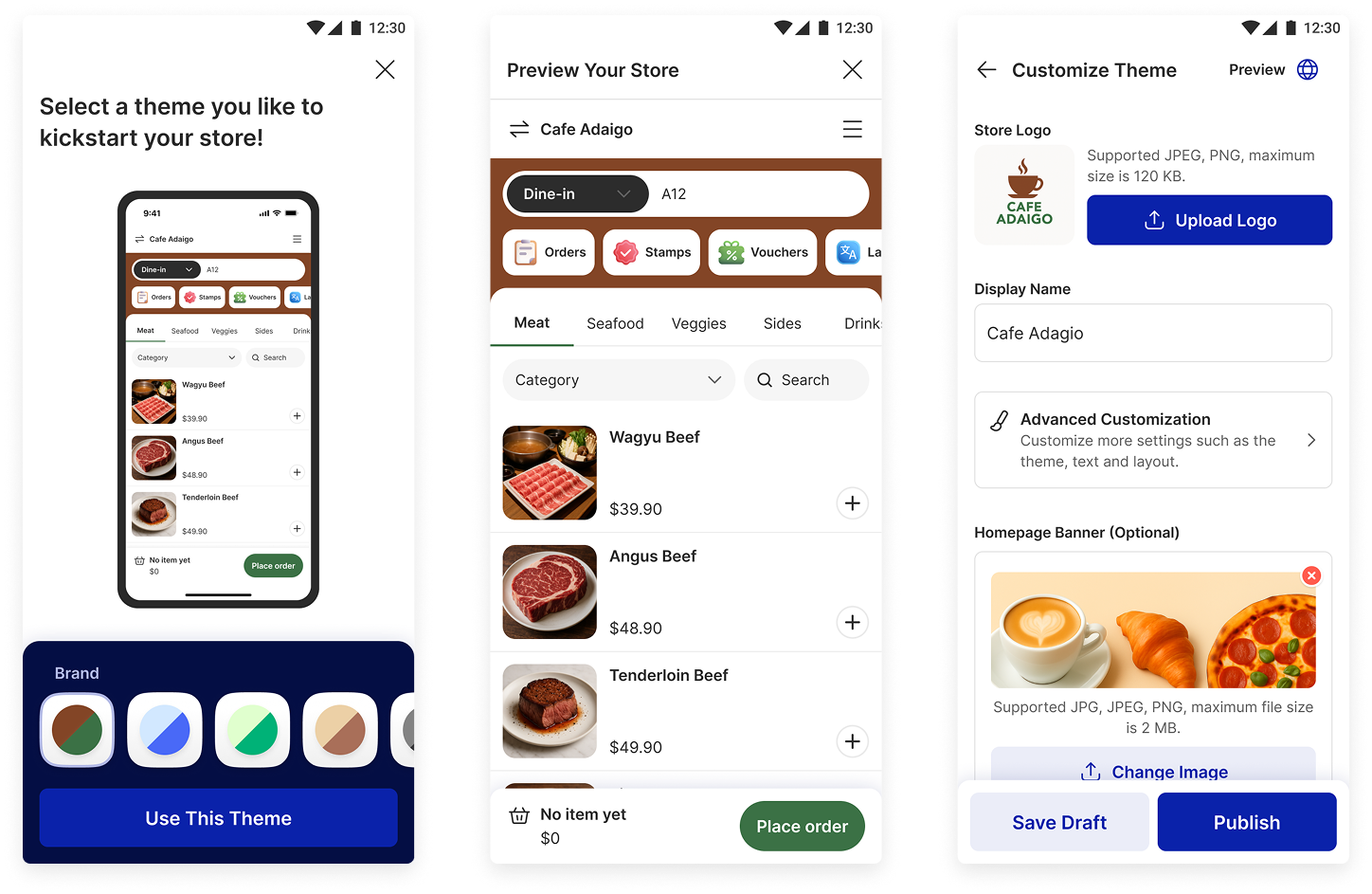
1. Customize online store for first time merchants
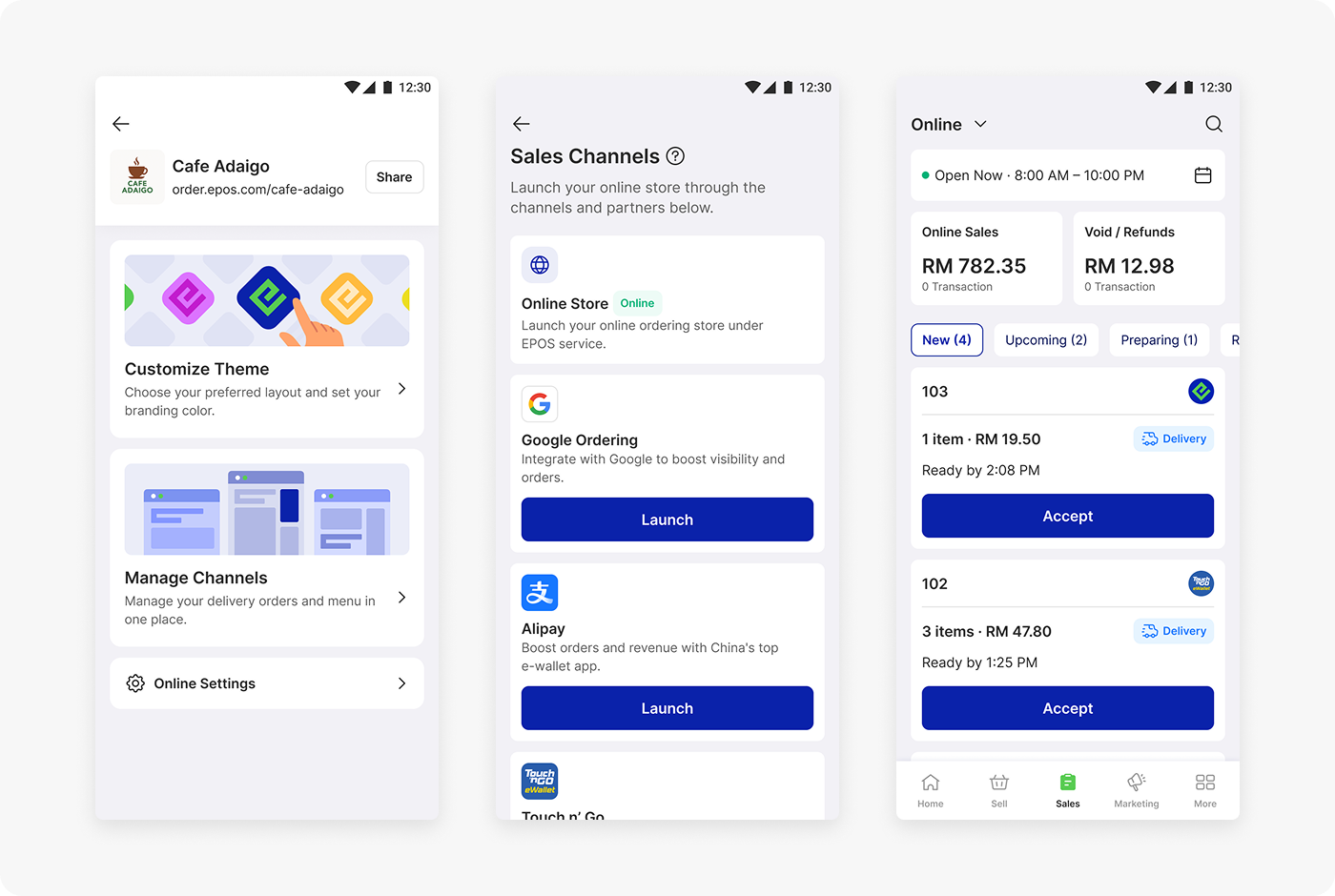
Guided store customization
First time merchants can quickly set up and customize their online store through a structured flow that lowers the barrier to entry and builds onboarding confidence.
- Online order management
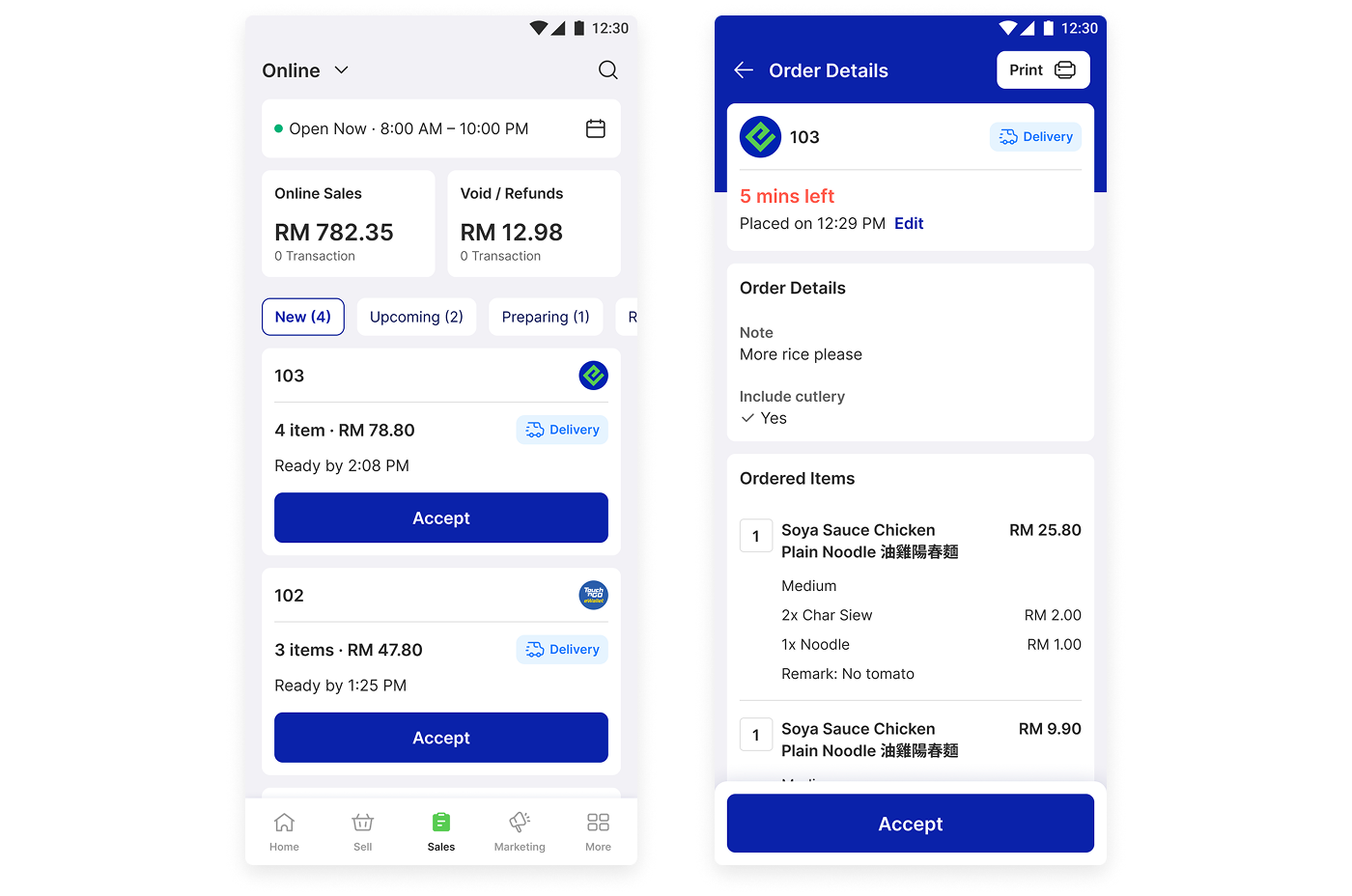
Unified online order handling
Incoming online orders appear within the same operational environment, allowing merchants to monitor and fulfill orders without switching between systems.
- Multi channel publishing to extend reach
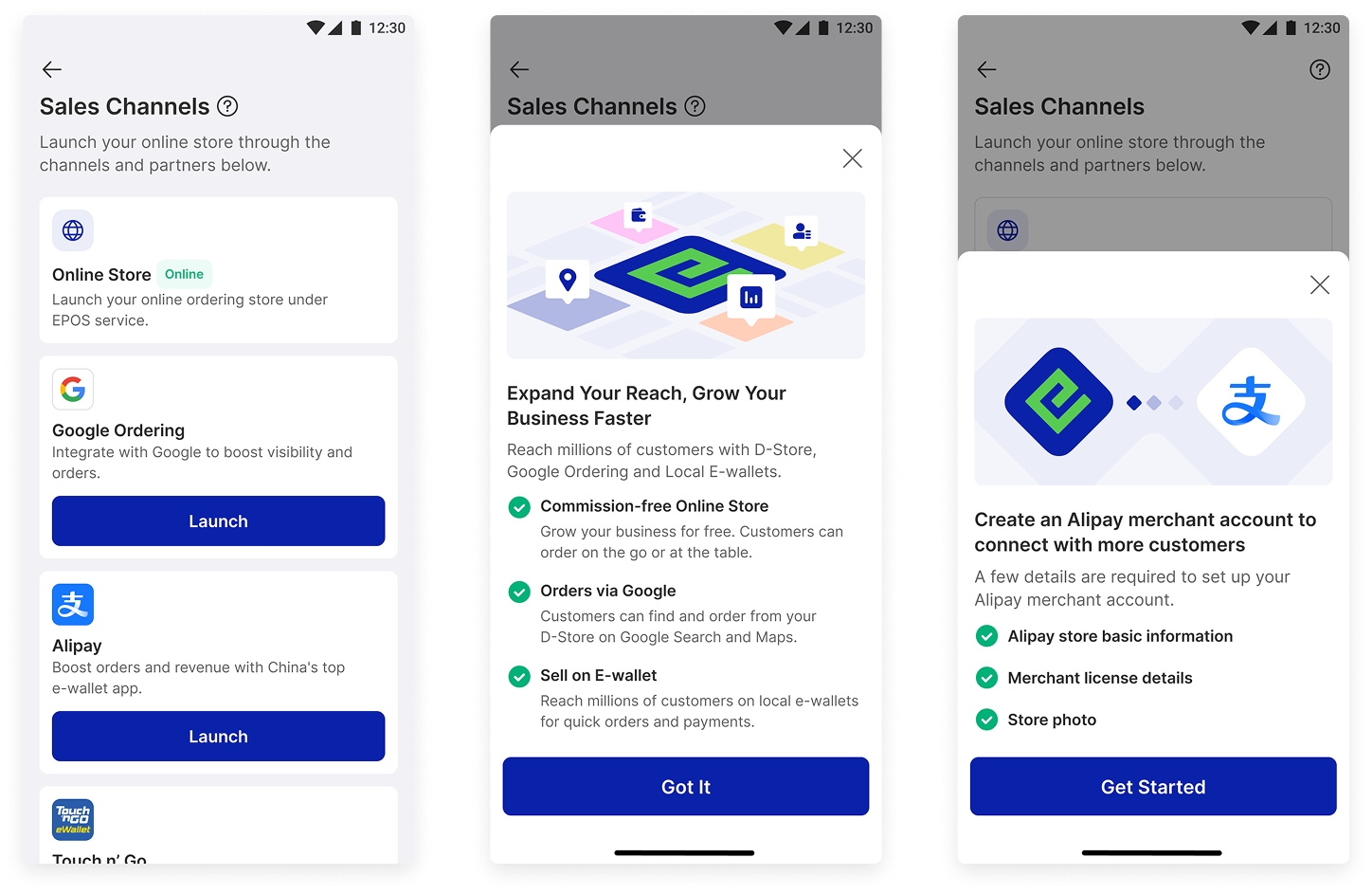
Multi channel launch
Merchants can publish their store to platforms such as Alipay, Touch n Go and Google Ordering from a single workflow, making expansion beyond in store sales more accessible.
Outcome
The online store capability complements the core operations flow by enabling MSME merchants to evolve from offline only selling toward a unified online and offline business model, without adding significant operational complexity.
Next Steps
Impact and Outcomes
The redesigned operations experience improved the overall efficiency and learnability of the EPOS 360 sell flow. Through Maze usability validation with 40 Southeast Asia participants, the updated design demonstrated a measurable reduction in time to complete checkout across key scenarios, including Single Amount mode, split payment and Item mode ordering.
The OCR assisted menu setup also shortened the time required for merchants to digitize their menus, lowering the barrier for first time POS adoption among MSME food and beverage operators.
Together, these improvements support EPOS 360’s goal of helping small merchants start faster, operate more efficiently and scale their business with greater confidence.
Key Learnings
Design for real merchant diversity
MSME food and beverage merchants do not operate in a single standardized workflow. Supporting multiple selling modes such as Amount, Item and Code was critical to accommodate regional behaviors, especially in Southeast Asia hawker and food court environments.
Reducing setup friction drives adoption
For small merchants, the biggest barrier is often getting started. Features like OCR menu creation significantly reduce onboarding effort and help merchants reach their first transaction faster.
Mobile POS demands interaction discipline
Designing for smaller mobile devices reinforced the importance of large touch targets, minimized taps and clear hierarchy. Small inefficiencies become amplified in high frequency cashier workflows.
Simplicity requires deliberate tradeoffs
Creating a fast sell flow was not about adding features but about removing unnecessary steps while preserving flexibility for complex F&B scenarios.